
Once a Video Screener has been applied to your job, all candidates who apply to that job via JobTarget going forward will be invited to complete the Video Screener.
You can also manually invite candidates to complete the Video Screener directly from the platform.
- Open the Video Screener App.
- Click the 'Invite Applicant' button in the upper right-hand corner.

- Fill in the required fields within the the Invite Applicant pop-up window.
- Relevant Job
- Candidate Name
- Candidate Email
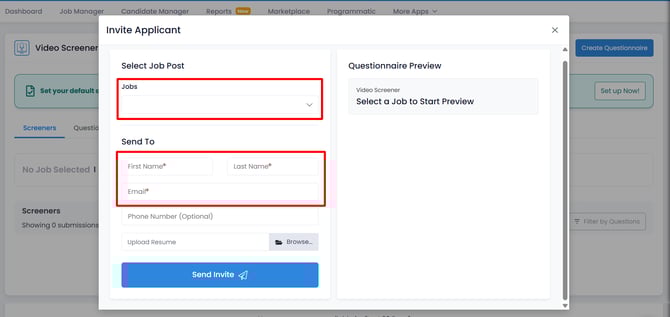
- Preview the questionnaire attached to your chosen job.
- Click 'Send Invite.'

Once an applicant has been invited to complete the Video Screener they will appear in your Candidate Manager with the name, contact information, and resume entered when the invite was sent out.
💡For more information, see our Video Screener User Guide!