
In This Guide...
- Indeed's Job Posting Options
- How to Set Up your Indeed Sponsored Campaign in your JobTarget Account
- Frequently Asked Questions
Indeed's Job Posting Options
Organic (Free) Jobs
Indeed offers limited, free exposure of an employer's jobs via Indeed.com or through your ATS.
Organic job postings on Indeed are not available through JobTarget.
If you want to post jobs organically, you'll need to do so through your ATS/HRIS system or directly on Indeed.
Sponsored (Paid) Jobs
Indeed also offers a paid/sponsored option for a job to increase exposure to job seekers on the site.
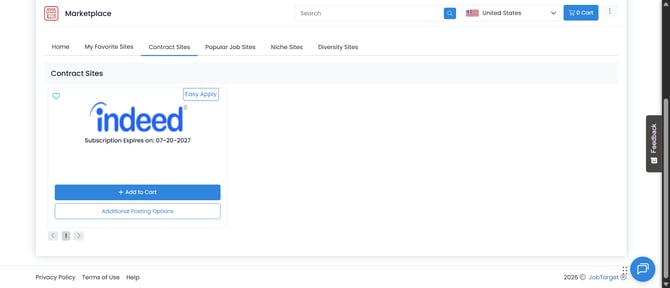
JobTarget supports 2 Indeed Sponsored posting options through the Marketplace:
| Posting Option | How It Works | Active Indeed Sponsorship Needed? |
| Single Sponsored Postings |
Purchase a single sponsored posting through the JobTarget Marketplace, no setup required. Note: These postings will not display in your Indeed account. |
No |
| Sponsored Jobs Campaign | JobTarget connects to your existing Indeed account and manages your sponsored postings and budget automatically on an ongoing basis. | Yes - Required |
JobTarget only distributes sponsored (paid) jobs on Indeed. Your Indeed account must have sponsorship configured.
Not sure which account type you have? Check with your Indeed account representative, or log into your Indeed Employer Account under Budget Settings.
If you're interested in starting an Indeed Sponsored Jobs Campaign, we can help with that! Contact your JobTarget Relationship Manager to get started.
How to Set Up your Indeed Sponsored Jobs Campaign in your JobTarget Account
JobTarget refers to pre-purchased credits, subscriptions, or contracts with job sites as "inventory". Your Indeed Sponsored Jobs Campaign would fall into this category.
To set up your Indeed Sponsored Jobs Campaign, follow the steps below:
- Find and click the Inventory Manager app.
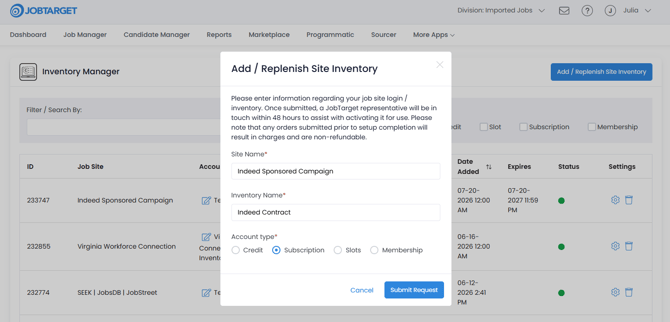
- In the top-right corner, click Add/Replenish Site Inventory. A form will populate.
- In the Site Name field, type Indeed. From the drop-down menu that appears, select "Indeed Sponsored Campaign".
- You MUST click the "Indeed Sponsored Campaign" option in the drop-down menu; do not select any other option or enter any other verbiage.
- In the Inventory Name field, type in any name that will allow you to recall your inventory. Most customers simply type in the name of the site.
- In the Account Type section, select Subscription.
- Click Submit Request.
-
Once your request has been submitted, a JobTarget Customer Support Rep may reach out to you to request additional information regarding your Indeed Sponsored Campaign (i.e., Source Name, etc.).
-
Should you need to gather this information, you'll be able to retrieve it from your Indeed account representative or by logging into your Indeed Employer Account.
-
If you have any trouble, don't worry - We're happy to help over a live screenshare call while you're logged into your Indeed account!
-
-
For more information about inventory and how to load job board contracts, see our Inventory Manager User Guide!
Frequently Asked Questions
How do I check if my jobs are running as sponsored in my Indeed dashboard?
Note that only postings that are advertised using your Sponsored Jobs Campaign will display in your Indeed dashboard. Any single sponsored postings purchased via the Marketplace will not show.
To view if your jobs are running as sponsored in your Indeed Sponsored Jobs Campaign, you'll need to follow the steps below:
- Sign in at employers.indeed.com.
- From the left-hand navigation, select Analytics, then Jobs and Campaigns.
- Here you will see impressions, click-through rate (CTR), spend, and applications per job and campaign.
For more details, see the Indeed Employer Dashboard Guide.
Analytics only appear for sponsored jobs. If you see jobs listed but no data, it means those jobs are not yet being sponsored or the feed connection is still being set up. Contact your JobTarget Relationship Manager if this persists after 24 hours.
I’m on Monthly Recurring Sponsorship and have no end date. Is that a problem?
No — that’s expected for Monthly Recurring. You do not need to provide an end date.
What’s the difference between a Marketplace single and a Sponsored Job Campaign?
A Marketplace single is a one-time purchase per posting — no Indeed sponsorship needed. A Sponsored Job Campaign is an ongoing arrangement requiring active Indeed sponsorship.
Can I post to Indeed internationally through JobTarget?
Yes, you're able to post internationally for Marketplace singles postings and Sponsored Job Campaign postings. All billing is in USD.
I see jobs in my Indeed dashboard, but no analytics. Why?
Analytics only show for sponsored jobs. Contact your JobTarget Relationship Manager if this persists after 24 hours.
How long until my jobs appear on Indeed after posting?
Jobs will appear on site within 12 hours. As with any other sponsored job posting, whether your job ad is served to a jobseeker depends on various factors. Feel free to reach out to your JobTarget Relationship Manager if you have any questions about how to attract your target audience.