
⚠️ Most JobTarget users will create jobs directly in their ATS/HRIS, to be brought over automatically or manually via the integration or an Importer.
If you access JobTarget via integration through your ATS/HRIS, your jobs should be created in your ATS directly, then brought into JobTarget manually through the integration or via an importer.
If you use JobTarget without an ATS/HRIS, utilize our RecruitSite product, or have a Confidential Postings division, you will have the ability to create jobs directly within the Job Manager.
- Log in to JobTarget and navigate to the Job Manager.
- If you are creating a job for confidential posting, ensure you have the correct Division selected in the upper right-hand corner of JobTarget.
- Click 'Create New Job.'
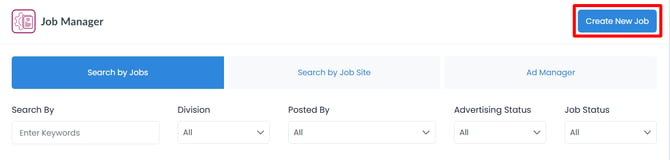
- Don't see the 'Create New Job' button? Your account is likely set up for job creation directly in your ATS/HRIS. If you believe this is an error, or would like to learn more, Create a Support Ticket.
- Fill in the necessary details of your new requisition.
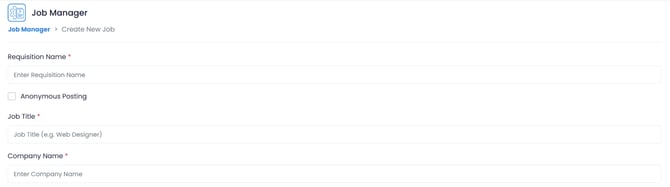
- Click 'Save.'
To duplicate an existing requisition...
-
locate the desired job in your Job Manager
- Click on the three dots next to 'advertise again.'

- Click 'Duplicate Job.'
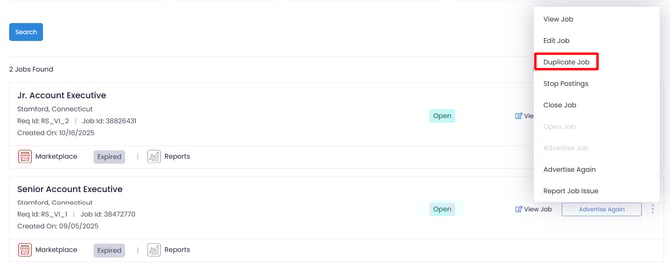
- You will be redirected to the Create Job page, with the details duplicated from your chosen requisition.
- Make any desired changes.
- Click 'Save.'
💡For further inquiries and assistance regarding job creation, please contact your Relationship Manager or submit a Support Ticket.